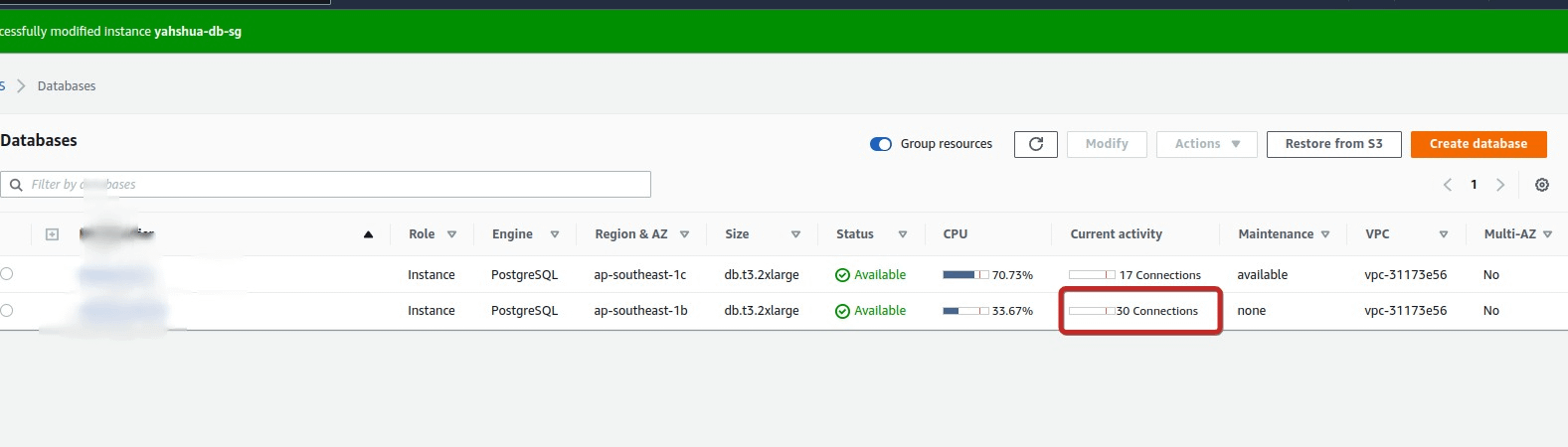
30 connections is way below the expected limit, it’s closer to 2k for that instance type https://sysadminxpert.com/aws-rds-max-connections-limit/ it’s likely that your application have inefficient queries, maybe missing an index?
You would need to change it in the parameters group section and reboot your RDS instance for the max connections to increase since you’re changing a static type attribute
What type of connection do you have to RDS? We found that it was a big issue with lambdas/server less/apigw as that can scale quickly.
Try logging into the db with pgadmin or something and see how many connections there are. I have found that metric on the console only sort of reflects the current running queries or something, does not seem to correlate directly to connections.
If it is a problem, the way we have solved it is with RDS Proxy which maintains a connection pool to the db, it’s quite cheap and works well with lambda.
Your performance can increase if you add more IOPS by increasing storage size. Also, you may need to tune your queries. Are you using db transactions? Are you using connection pooling?
How many EC2 are connecting the database, what is the application implemented in Java/Nodejs /python? Are you doing any connection pooling. Also are you closing the connection properly.
If you use the default parameter group, the limit is much higher. Maybe the limit is on the application side? Like a limit of connections of the webservwr?
Also, that is a huge DB instance. How many concurrent users do you have? Cause if it’s 30, then something is really wrong here.
Yeah that wasn’t the problem. We are using sequelize but we turned connection pooling off so it wouldn’t create too many. The problem is burst rates, we have automations that process thousands of API requests in a very short time which overwhelmed the db server. We’re also running a smaller instance.
The problem is you either have to creat and tear down the connection every time, or have the lambda hold on to it when it freezes and thaws. When the lambda gets destroyed there’s no event to close the connection so they’re all just hanging there.
At the end of the day, proxy costs like $50 a month and solved the problem in a better way than brute forcing it.
Putting RDS specifically aside, you can get this problem with a low amount of concurrent connections with regular sql.
It can happen if there is a lot of short lived connections rapidly occurring where connection pooling isn’t being utilised, you end up getting socket exhaustion on the server, because after the connection is closed there’s usually around a 60-90 second timeout period on the port.
I have been battling with this for the past few months. I have been using jmeter to load test and am getting 500 server errors and at that same limit of 30. However if i slow down the how many instances are starting per sec, it slows down the number of 500 errors.
I spent a bunch of time with aws techs on it. They claim that APP needs to back off the requests. In my case I am using rds mysql. You too?
I haven’t found a solution. I am using s3 and bringing down images from s3 to my ec2. The error I get is an occasional bucket not found. But I know it exists since the first 20 or so requests worked fine.
What I did was catch the 500 error and popup a sweetalert on the users screen saying “network congestion” and asking if they want to try again.
Not a good solution but I am out of cycles to work on it. Getting 500 errors (and 504 errors) is a known issue on aws. Look it up.
So I think this is an s3 issue, but if you aren’t using s3 maybe I am barking up the wrong tree. Btw, I am using aws cli and do the transfers asynch with a promise.
I haven’t considered looking into the mysql that I am also using as being the issue.
Sounds like this is an issue in your application. Sounds like you. have it running on EC2 …what are your connection pool settings? If you’re limiting the pool to 30 from your app, you may need to increase it there.
Create the custom parameter groups and increase the value max_connections as I remember. The DB need to reload and you can monitor the result on AWS RDS console.
Please search the google with increase the connection on AWS RDS. I dit it on MySQL RDS.