My humble open source template+script to deploy stable-diffusion on EC2 fully handsfree

I have recently open-sourced a template+script for deploying SD on EC2 fully automated.

Handsfree-stable-diffusion is a CloudFormation template+script for deploying Stable Diffusion webui - fully hands-free.

I originally created this script because my ancient 2014 laptop is impossible to run stable-diffusion in any meaningful way. This script enables me to explore stable diffusion and keep the cost very low by deploying and removing all the resources anytime.

I believe by open-sourcing this template+script, it can benefit some of you brothers and sisters who are lack of a fancy GPU but love to explore stable diffusion.

Why this script?

  • Instance configuration to find the right GPU, AMI and driver can be a lengthly process, I have done the chore and figured out the right combination to create this template+script
  • Installing dependencies often requires one to babysit the CLI, the script fully automates the process

The Github link: https://github.com/MarcoLeongDev/handsfree-stable-diffusion

This is my first attempt to open source something, please be kind and roast me softly (?) Any feedback is welcome welcome the repo of the technique used in the CFN and scripting.

AMA, this can help improving the FAQ of the repo

Thanks for sharing- will try out this week and let you know how it goes

thanks for sharing, the point of improvement I guess here would be in terms of costing for the EC2 instances (which doesn’t come cheap) if we need a more powerful computing power.

This is my first attempt to open source something, please be kind and roast me softly (?) Any feedback is welcome welcome the repo of the technique used in the CFN and scripting.

I do a lot of CFN (though I’ve never used Stable Diffusion) so I’ll give it a quick review:

KeyName parameter

Vague variable name. I’d rename it to EC2KeyPairName or similar.

AmiId parameter

You can pull a lot of these from SSM parmeter store in a lot of cases. For this on in particular Canonical has instructions on how to retrieve the ID here:
https://discourse.ubuntu.com/t/finding-ubuntu-images-with-the-aws-ssm-parameter-store/15507

This will always give you the latest AMI. However DLAMI in particular doesn’t appear to be publishing to SSM Parameter Store so I guess you’re out of luck. I’d link the instructions on how to get the latest ID here instead: https://aws.amazon.com/releasenotes/aws-deep-learning-ami-catalog/

SecurityGroup resource

SSH open to the world isn’t great, though sometimes necessary. Is using SSM Session Manager a viable alternative for this use case?

Auto-delete Never

What’s that tag?

UserData

At a minimum put set -x at the top for bash debug logging. UserData launch failures tend to be a giant pain to troubleshoot otherwise. Setting that will give you a lot more ouptput in the EC2 System Log in case there’s a failure Also consider set -euo pipefail.

      sudo -u ubuntu tmux new-session -d -s "stable-diffusion-session" watch "df -h --output=source,pcent | head -4; echo ""; cat progress.log; echo ""; echo "";  tmux list-sessions" \;  split-window -h -p 75 nvtop\; split-window -v "git clone https://github.com/AUTOMATIC1111/stable-diffusion-webui.git stable-diffusion-webui; bash $INSTALL_DIRECTORY/stable-diffusion-webui/webui.sh --listen --xformers --enable-insecure-extension-access --skip-torch-cuda-test; read" \;

Not a fan of having this as a one-liner, it’s hard to read. I’m not entirely following what you’re doing here. Why are you messing with tmux for setting up the listener? Why not just background it with &? If you want to improve things further you could create a proper systemd service file and use that. (Or is Ubuntu still using Upstart? Same idea)

To launch again

You can probably set this to execute on boot as part of the userdata script.

Wait for 500 seconds for webui to install before continuing to install tweaks

Is there not a more deterministic way to tell when it’s complete? A hard 500 second wait is a bit heavy handed and prone to issues if it takes longer than expected - and wasteful if it’s a lot faster.

EIP

The EIP could be made optional with some conditionals in the template. Think a boolean input parameter called “RegisterEIP” or similar. You could also do something like automatically creating an R53 DNS entry that points to the public IP of the instance. Which should remove the need for an EIP entirely if you’re willing to wait for DNS propagation times (set a low TTL).

Overall a pretty solid template. The stuff above is pretty much all nitpicky stuff that wouldn’t matter from a functional standpoint.
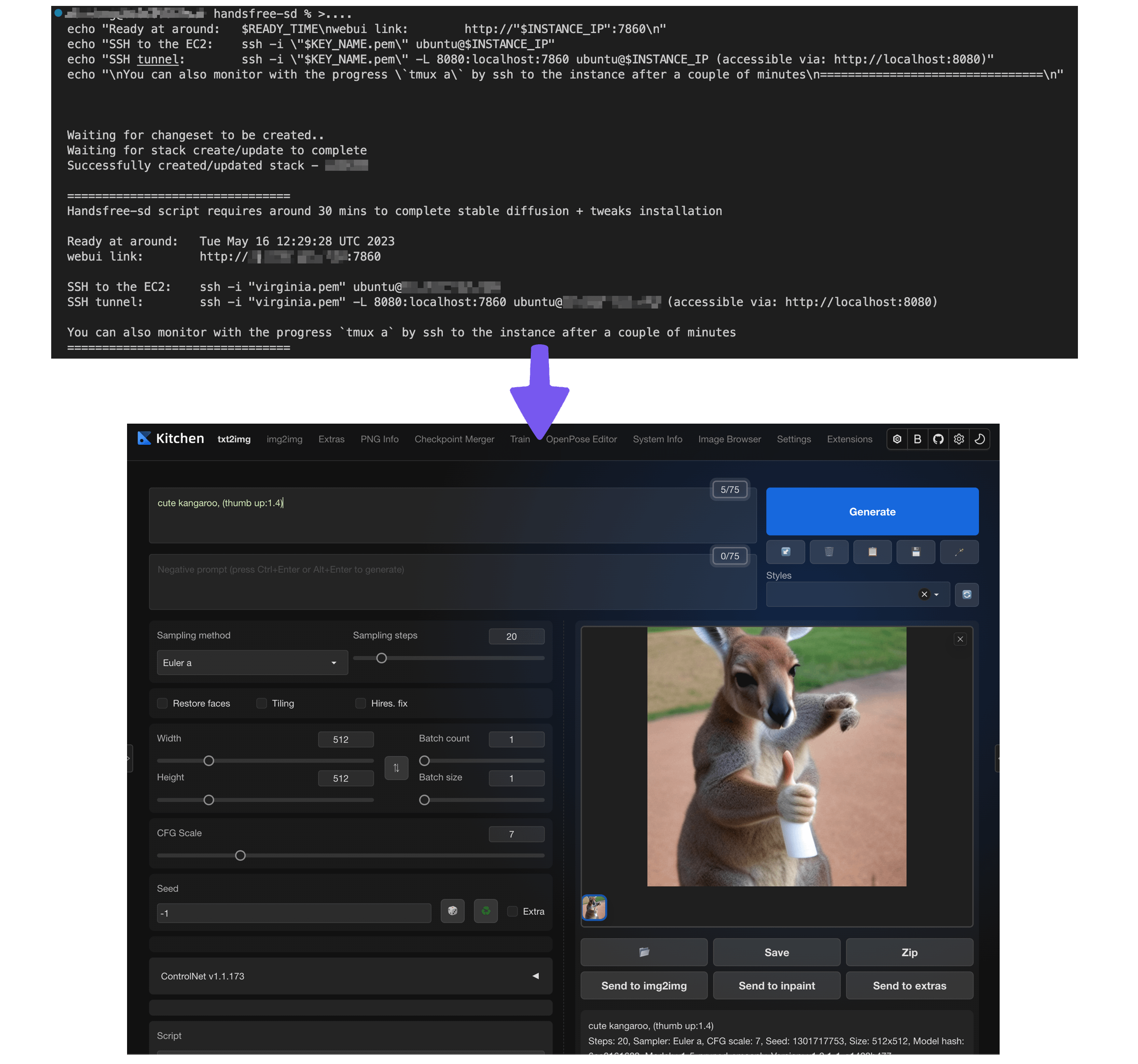
Any suggest is welcome!

Very cool! I had been wanting to do something like this. I set up a G5 instance for SD and your architecture and setup steps are very similar to what I ended up with. A few comments:

  • IMO, auth (e.g. `–gradio-auth`) should be used/enforced. Otherwise you’re opening yourself up to bots/attackers
  • Adding ngrok could be nice too (e.g. for https support)
  • It’d be nice to support spot instances, since they’re way cheaper
  • You might want to add a note that most users will need to request an increase in quota (above zero) for G instance types (or at least that was the case for me)
  • Nice to have: a CloudWatch alarm that automatically shuts down the instance after X hours of inactivity (this saved me so much money)

But overall, nice work! And great writeup/readme!

Alternatively, particularly due to the aim from OP to be open source, use zrok.io. It can either be self-hosted or has a free SaaS. It also includes cool features like ‘private sharing’. I work on the parent project (OpenZiti).

That’s extremely insightful, I need sometime to review all the suggestion and will be update the script accordingly. A quick responds to the suggestion:

  • Keyname to EC2KeyPairName: agree, that’s a better common terminology
  • AMIID: I will see how if i can automate this, but since us-east-1 is the cheap and this type of explore isn’t latency sensitive. It would be in a later upate
  • SecurityGroup resource: I am debating if this is the right choice, the version i use myself uses SSH tunnelling. But i think it would be too much to introduce another concept for beginner so ended up removing it. If look close the one of the screenshot shows the suggested SSH tunnelling command
  • Auto-delete: removed, not needed in this use case
  • UserData: that’s a way to supply the startup bashscript
  • set -x and set -euo pipefail: not fully aware of this option! I will test this out and add to the script
  • tmux one-liner: I am not a bit fan of it either. The intention is to allow it to be attached and neatly show the nvtop and the stable-diffusion output. Also tmux is being use for parallelise. So this is quickest but dirty way to provide the experience. Will look in to upstart in future versions
  • wait 500: again it is a quick and dirty way to get things done. The installation of stable is non-blocking. Good if there is way to detect when the installation is done so it can be more reactive. I will find this out next updates
  • EIP: i agree that can be optional. But since the audience may not be know awscli, i guess if the don’t use EIP and stop the instance, i will have to include the command in the readme for the to find out the new random ip for each restart. EIP help to make the IP constant without invoking other services like R53

Again, very thankful for the feedback. That should be good to keep me busy for a while

  • gradio-auth definitely look into this to help to security SD
  • ngrok something new to me, will be investigating to see how it fits the stack
  • limit increase on G instance type will be adding this information in the readme instructions
  • auto-shutdown What is the your current method? monitor the cpu usage for inactivity? or just specific time?

Thank you for your input, i will be study these and improving the template/script

This is super nice! :slight_smile:

I did something similar with Terraform here github.com/ciberado/stable-diffusion-webui-terraform-spot, but I think your installation script is better than mine :slight_smile:

Thanks for sharing!

Unfortunately, I deleted my stack a little while ago, so I can’t check exactly what I had set up. But yeah it was based on CPU activity. I think it was something like “Max CPU is less than 5% over the past 1 hour”. I think I used this as a reference.

Also, FYI ngrok is already built in to A1111, via the --ngrok argument

Hi Marco, I’m a noob at this. Can you explain what this does for me?

Does it auto-update SD? Does it retain a workspace for me when I log out and log in again after a break, so that my models and extensions do not have to be loaded or downloaded again?