Hello everyone,
I want to get a picture that is updated approximately every 6 hours (after 0:00, 6:00, 12:00, and 18:00). Sadly, there is no exact time when the image is uploaded so that I can have an easy 6-hour schedule. Until now, I have a CloudWatch schedule that fires the execution of the lambda every 15 minutes. Unfortunately, this is not an optimal solution because it even fires when the image for that period has already been saved to S3, and getting a new image is not possible.
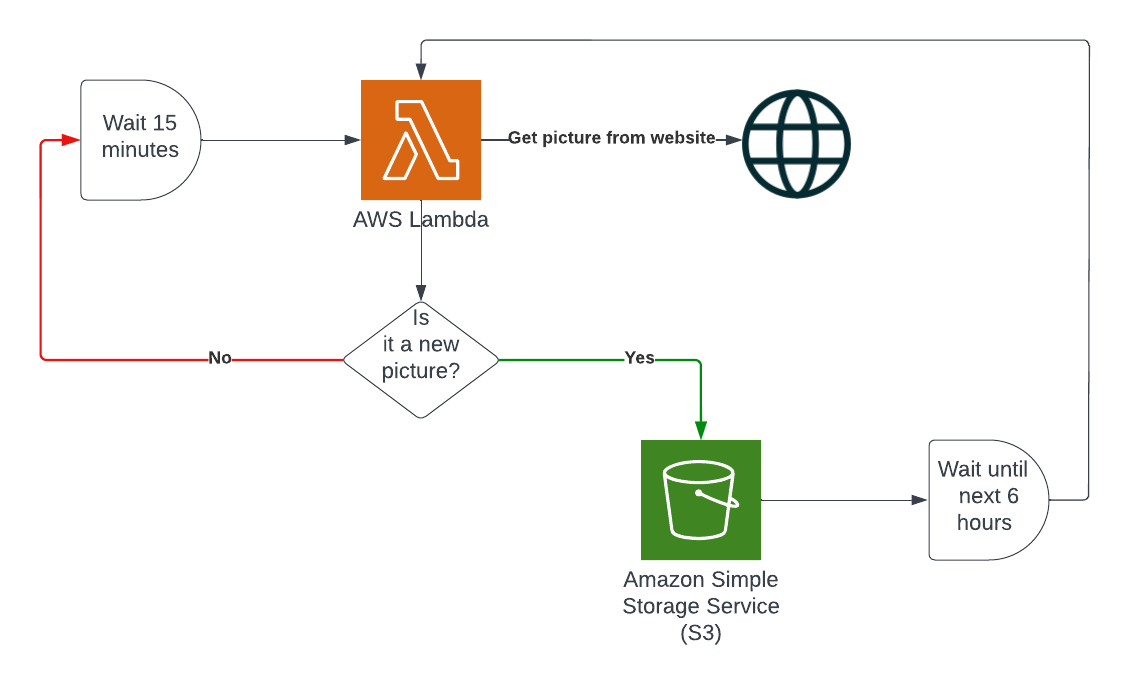
An ideal way would be to schedule the subsequent lambda execution when the image has been saved to S3 and while the image hasn’t been retrieved, and the time window is open, to execute it every 15 minutes.
The schematic below should hopefully convey what I am trying to achieve.
Is there a way to do what I described above, or should I stick with the 15-minute schedule?
I was looking into Step Functions but I am not sure whether that is the right tool for the job.
You are almost there, instead of scheduling the lambda every 15 minutes, just have EventBridge invoke the lambda every 6 hours. That’s half of the requirement.
Then you just need your own lambda to determine if the image changed, store it if it does. If it didn’t, put (upsert) a rule in EventBridge with the exact time for the next invocation (now + 15 minutes.)
Another fun solution would be using StepFunctions, but you might need to have independent processes for each step (checking if the image changed, deciding to schedule or store, etc…)
Step functions should be perfect for this. You can also keep the current file SHA in the Step Workflow state. That way, you don’t have to make additional fetch calls to S3.
Lambda function:
Input argument is current_sha
Fetch image from URL
Generate SHA for asset
If changed, save to S3 and return new hash, changed = true
else return current_hash, changed = false
Save the new SHA to the step functions state.
Use the output of the function into a Step IF statement, if the changed flag is set, WAIT 6 hours then loop back to Lambda
If changed flag is false, WAIT 15 mins then loop back to Lambda.
There are lots of ways of doing it with Step functions, for example, you could put the hash comparison as part of the step, but I think the above would probably be simplest to implement. Another limit is that the workflow will only function for 1 year, but you could work around that if it’s an issue (ex. making a new workflow every 6 hours).
Cloudwatch event every 6 h.
Set a redrive policy on the lambda so that it retries again after 15 min, for a maximum of of 6x4-1 times.
Make the lambda fail execution if the image is not available yet.
I like how the SHA checks are used to check whether it’s a new picture. Unfortunately, I have not worked with step functions before, so maybe I will look into your solution at a later date. Thank you very much for that extensive comment!
I think I didn’t quite get over what I was trying to achieve. The lambda shouldn’t trigger when a new s3 object is created but at a schedule to test if a new image was uploaded to a website. Unfortunately, I don’t have any way to find out whether there is a new image unless I check the last modified value in the HTTP response.
I solved that part by comparing the last-modified value in the HTTP-Response with the last given one. Of course, I could run that script every x minutes, but that would incur many not needed costs in the long run. These costs are why I want to reduce the number of times the lambda function is triggered.
That would need something like another lambda function that stops the 15-minute schedule, wouldn’t it?
I did this logic directly inside of the lambda where I fetch the image.
That would be the easiest solution, but the image I am scraping is of a weather map, so it would be good to have a recent image as soon as it is available. The 15 minutes are the time frame I think is acceptable in my use case, but a 5:55 hour wait would probably not be suitable.
This seems like an excellent solution. However, I can’t find any documentation on how I could create an EventBridge event that only retries after 15 minutes. Can you give me some more keywords to use in my search, or do you have a link to documentation for me? Sadly I am only starting to use EventBridge and don’t have experience using it.
Yep, I get you. I do a lot of weather scraping too.
I like the idea of running the lambda every couple of minutes and comparing your cached image to what is online. I have some weather bots that run every 5 minutes and the cost is nothing.
You can set SNS to trigger the lambda on S3 bucket event, you can still use the same lambda, just handle the S3 event in a separate function after parsing the event.