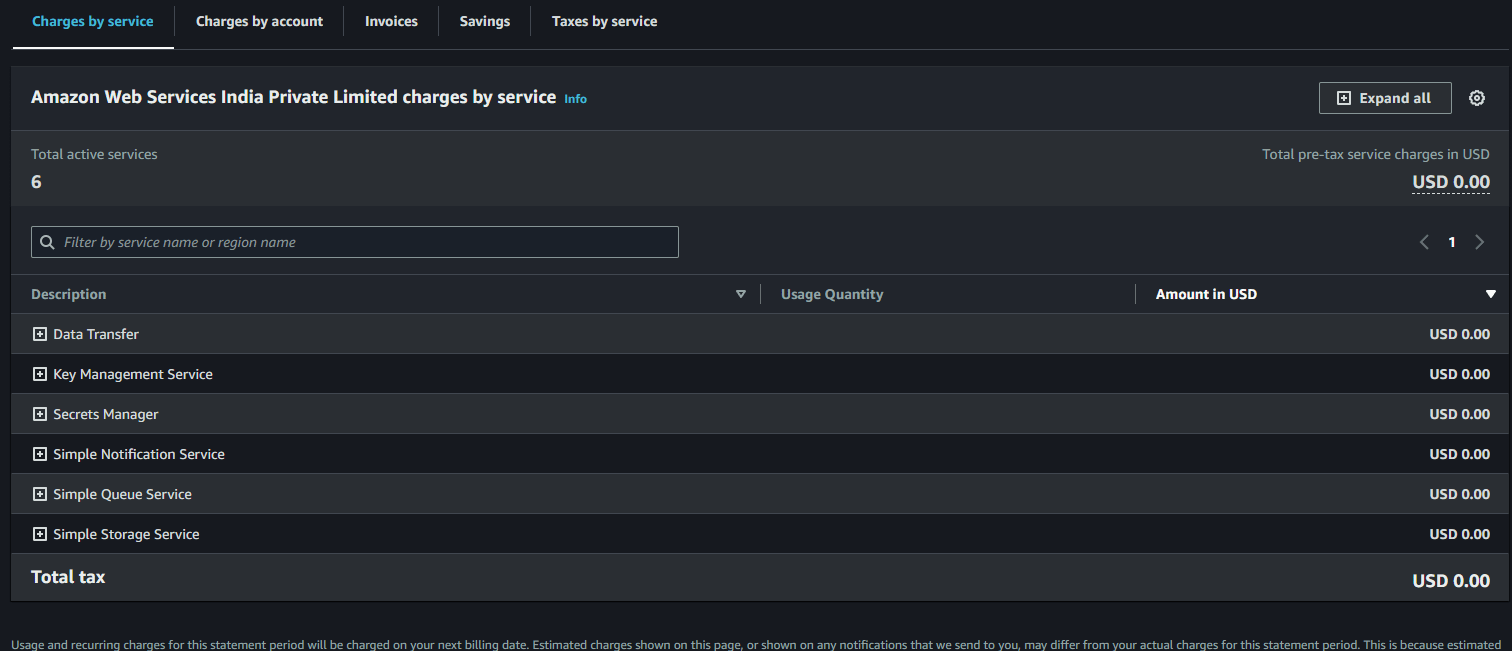
I am super new to aws(using the free tier which will expire this month).
few months back I had activated an EC2 instance but terminated it after a few hours.
last month got a mail from aws to check for any active resources in aws because since my free tier plan is expiring i will be charged from next month onwards. checked in may and everything was fine(0 active services).
decided to check once again 10 days before the free tier expires and now i am seeing 6 active services in my aws console.
I am freaked out right now, i just want to terminate these services (followed the steps provided by aws support people but not able to close the active services because when I go to a particular services’ console, lets say, for example I want to terminate s3 service active in N. Verginia region, I go to s3 console to delete its bucket as instructed by aws support but there is no s3 bucket created in any of the regions. similar is the case for all these services that are active)
i want to know how do i terminate these services and close this account so that I dont have to worry about getting a bill from aws
Go to Tag editor, and simply search resources in all regions, but don’t specify a tag, it’ll list everything in your AWS account in all regions and you should be able to see what’s lying around.
Some things will be default AWS stuff, but you should able to identify resources you created yourself
thanks for the reply, i opened tag editor and filtered by all regions and all resources and it shows me a big list of 158 resources. under the service column of these resources i only get EC2, while under the type column i see Subnet, DHCPOptions, VPC, netwokacl, securitygroup, internetgateway, routetable types only csv file of all 158 resources in tag editor
if you need help, I could guide you.
As a person who was new to AWS, and got messed up by their billing, I know your feeling.
We could set up a zoom meeting session, and I could guide you ( with my best effort / as long as it is in my knowledge of course ), you will be the one who execute & I won’t have access to your computer / aws account.
You will, there will be a lot, and don’t be scared by the 158! When you create an AWS account you get a default VPC default security group etc in each region which you don’t pay for.
By the look of your list, it looks that this is all it is, given your original query shows $0 spend I wouldn’t worry too much about it.
Let me use this opportunity to wish AWS would do it like Azure does… in Azure, all resources are in a Resource Group, and can be terminated by deleting the RG. I’m pretty I created and deleted the foo resource group over a hundred times while studying for my Azure exams… makes it so easy to clean up after a study session.
Oh, and inherent in an RG is an ARM template; the Azure equivalent of a CF template. If you want to make your GUI or CLI-generated work into a repeatable solution, you have a great start already.
its urgent for me cause my free tier is about to expire and i am still a student so dont want any debt as i have 0 income right now. appreciate the reply tho.